
Reflex helps students improve their foundational math skills by building fast, automatic recall of basic math facts through efficient, consistent practice alongside your regular instruction. When students don’t have to stop and think about basic math facts, they have more mental energy for problem-solving, reasoning, and grade-level math work.
Just getting started with Reflex and wondering what to do first? You’re in the right place. Read on for quick answers and simple Reflex math tips for teachers to help you get started.
When should I use Reflex?
You just got Reflex (amazing!), but now what? You might be wondering, How and when should I use Reflex? Remember that Reflex is a supplemental math tool, not a replacement for direct instruction. Reflex is flexible to fit your needs, but you’ll see the most results when it becomes part of your daily classroom rhythm.
Where does Reflex fit into a daily math routine? Here are effective times that teachers commonly implement Reflex:
- Morning warm-ups
- Math centers or rotations
- Independent practice time
- Intervention and remediation blocks
- Homework (if devices are available)
How long should each Reflex session be?
How long should using Reflex in the classroom actually take? Reflex works best in short, focused sessions that easily fit into a busy day.
Best practice:
- 15–20 minutes per session
- 3–5 times per week
How often should students use Reflex?
During each Reflex session, students stay motivated as they work toward the Green Light, a simple visual indicator that shows their daily progress in fact fluency. As they answer facts correctly, the ring fills in, turning green once they’ve met their goal. Most students can achieve the Green Light with about 15 minutes of focused practice.
“I have seen more growth with my students' math facts in the last two months than I did in the previous months with the other platforms I was using! My students even asked if we could just keep it until the end of the year!”
—Teacher, Kankakee Valley School District
What about Reflex and screen time?
It’s natural to wonder how much screen time is appropriate in math. Reflex is built specifically for short math practice routines that make the most of effective educational screen time, not long stretches in front of a device. With efficient, adaptive Reflex sessions, students get the practice they need to build math fact fluency fast, while math screen time stays intentional, purposeful, and easy to balance with your core curriculum, hands-on learning, and math discourse discussion.
What grades is Reflex for?
Reflex is designed for grades 2 and up to help students develop math fact fluency with addition, subtraction, multiplication, and division. It works best as supplemental math instruction, giving students targeted practice that complements core curriculum classroom instruction.
How do I know if my students are ready for Reflex?
Before building automaticity with addition facts, students should understand key foundations such as counting, cardinality, and basic addition concepts. Use the Reflex Readiness Quiz to ensure your students are ready.
Can I use Reflex with older students?
Absolutely. For middle school and upper-grade students, Reflex is especially effective as a math intervention tool. It’s a great option during math intervention and remediation blocks or support periods for students who still need practice with basic math facts, helping close gaps so they can focus more fully on grade-level math concepts.
How does Reflex support students with diverse learning needs?
Reflex is designed to support learners with a wide range of needs, including students with special needs and math learning disabilities like dyscalculia and dysgraphia. Built-in accessibility features help all students participate in math instruction. For example, Reflex factors out typing speed from math fact fluency calculations, allowing students with motor challenges or slower visual processing to accurately demonstrate their understanding of math.
Reflex allows students to experience the full program in English, Spanish, or French, supporting multilingual learners and offering additional resources for diverse learning needs.
How do I monitor student progress in Reflex?
Reflex gives you clear, actionable student data to guide instruction, form small groups, and target other interventions. Log in to your Reflex teacher account. From your Teacher Dashboard, you will see a variety of group and individual reports to monitor and celebrate student progress!
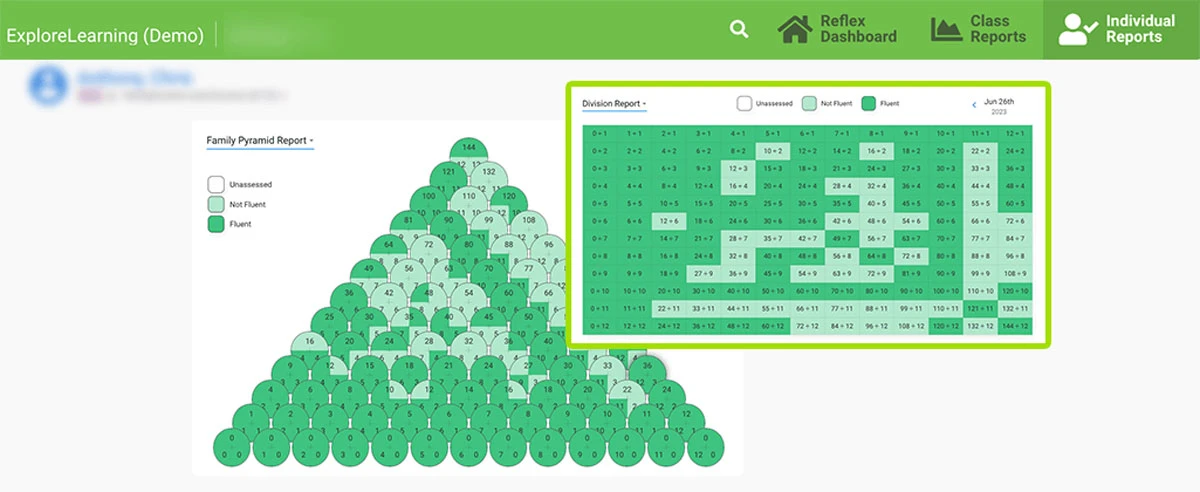
You can quickly see:
- Snapshots of progress
- Total math facts gained
- Math facts students have mastered
- Where students are still struggling
- Progress toward earning a Green Light
- Overall usage patterns
“As you can see, Reflex offers a suite of detailed reports designed to support instructional decision-making. I recommend starting with the Group Status report. Reviewing this report multiple times each week provides several key indicators to help you identify which students need additional support or more time on Reflex.
Once you’ve used the Group Status report to flag students of concern, you can then explore their individual reports for deeper insight into specific needs and progress.”
–Tonnie Hibbert, Senior Solutions Specialist
How can I use Reflex data with administrators or families?
Reflex makes it easy to show how teachers use Reflex data to guide instruction. You can share clear growth trends with administrators to support intervention decisions and help families see how short, focused practice builds math fact fluency.
Reflex is also a perfect bridge between school and at home. Encourage parents and guardians to set up a Reflex parent account to monitor progress and view reports that track their child’s math fact fluency over time.
How can I celebrate student progress on Reflex?
Celebrating progress keeps students motivated and excited to keep learning. Try simple, meaningful ideas like:
- Shout-outs when students earn a Green Light
- Classroom bulletin boards to make progress visible
- Monthly Green Light trackers and Reflex certificates
- Celebrating consistency, not just mastery
- Notes home recognizing effort and growth
- Celebrate Reflex Competition winners during announcements
Key Reflex takeaways for teachers
If you’re wondering about the best way to use Reflex for math fact fluency practice, remember:
- Keep sessions short
- Use Reflex consistently
- Check Reflex data reports to monitor instruction
- Celebrate student progress
- Pair Reflex with strong classroom instruction
This approach supports effective Reflex classroom implementation, helping students build the math fact fluency they need to succeed at every grade level.
Log in to your Reflex account today to get started! For even more resources and implementation support, be sure to bookmark the Reflex Educator Resource Hub and join the Virtual Learning Community.